
How to Take Photos for a Car Damage Report
A practical phone-photo guide for documenting car damage: the wide-to-close sequence, matching before and after angles, lighting technique, metadata handling, and the mistakes that make photos useless in a dispute.
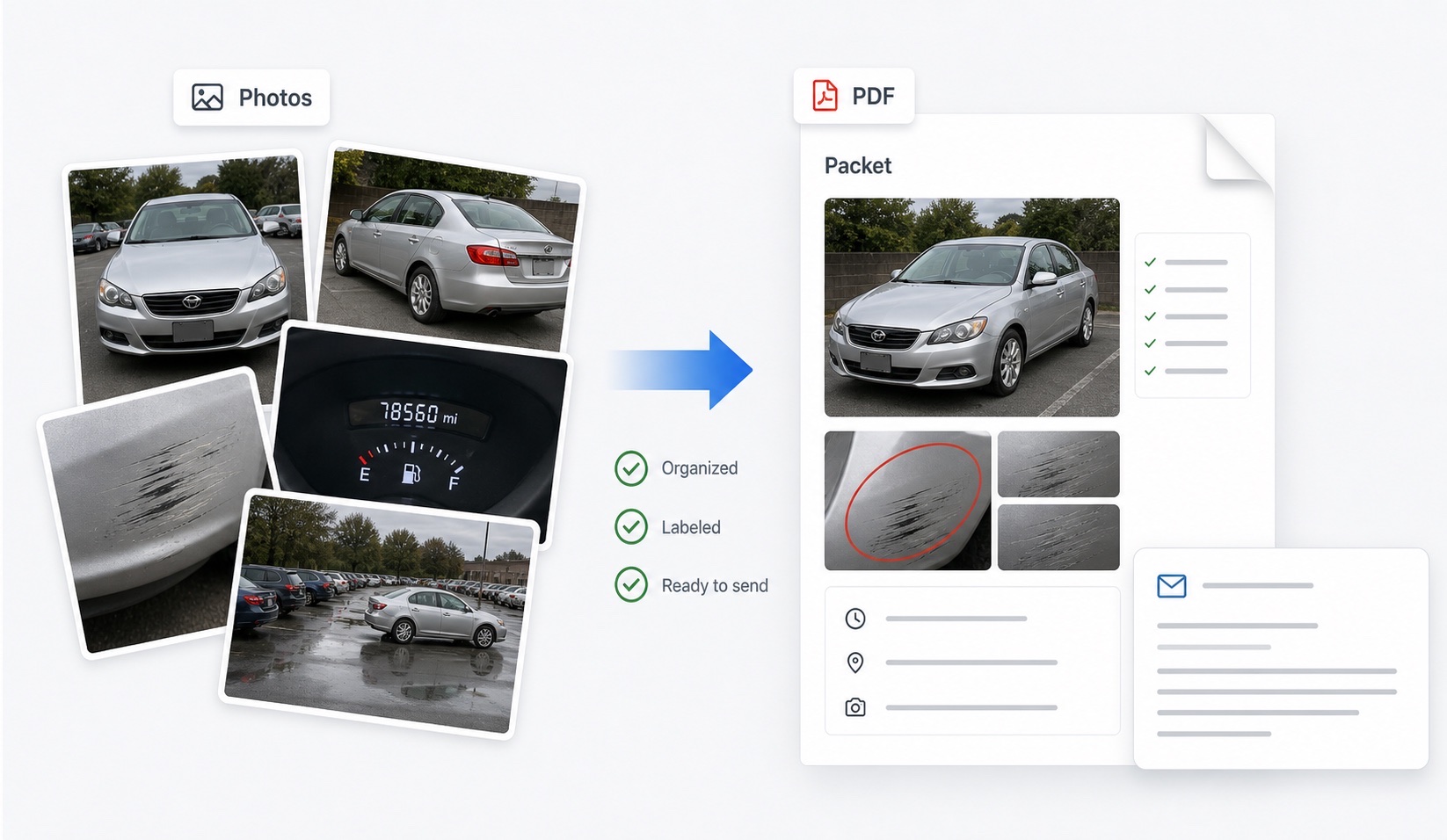
What is the right sequence for damage photos?
Work from wide to close, always. The single most common failure in damage documentation is a folder of dramatic close-ups that cannot be placed on the car: a scratch filling the frame could be on any panel of any vehicle. The sequence that avoids this has three tiers:
- Context: full-vehicle shots — front, rear, driver side, passenger side, and all four corners at roughly 45 degrees. These prove which car and establish overall condition.
- Panel: a medium shot of each affected panel, close enough to see the damage, far enough to show its position — include a door handle, wheel arch, or light cluster as a landmark.
- Detail: close-ups of the damage itself, with a coin, key, or fingertip in frame for scale on at least one shot.
Every close-up should be traceable back through a panel shot to a context shot. That chain is what lets a reviewer trust the image.
How do I match before and after angles?
Matched angles are the whole game in handoff disputes — rental returns, Turo trips, valet drop-offs. A before photo and an after photo of the same panel from the same position make comparison instant; two photos from different distances, heights, and light force the reviewer to guess. To match well: stand in the same spot relative to the car (use fixed reference points like the wheel or door seam), hold the phone at the same height, and shoot in the same order every time so the sequence itself becomes your checklist.
If you are building the “after” set and have the “before” photos on your phone, glance at each before shot and copy its framing. Pairing them side by side later — which is what DamagePacket does with uploaded sets — only works as well as the angles allow, so the thirty seconds spent matching framing pays for itself.
How do I handle difficult lighting and hard-to-see damage?
Most “the photo doesn't show it” problems are lighting problems. Fixes by situation:
| Problem | Technique |
|---|---|
| Shallow scratch invisible head-on | Shoot at a raking angle so light skims the panel |
| Reflections hiding the mark | Move until the reflection slides off the damage |
| Dark parking garage or night return | Use flash plus a wider, steadier shot; brace the phone |
| Harsh midday glare | Shade the panel with your body and expose for the panel |
| Wet car after rain or washing | Dry the panel if possible; water masks scratches |
| Dent with no paint damage | Shoot along the body line so the distortion shows |
Take several frames of anything marginal. Storage is free; a missing usable shot of the disputed panel is not.
Why do metadata and originals matter so much?
Phone photos carry EXIF metadata — capture time, date, device, and usually GPS location. In a dispute, that data does the work your memory cannot: it places a clean bumper at the return lot at a specific minute. Protect it. Do not screenshot your own photos (screenshots carry the screenshot's date, not the original's), do not send through channels that strip metadata when originals matter, and do not run images through editors before submission. If a claim reviewer, adjuster, or benefit administrator asks for originals, being able to produce untouched files with intact metadata quietly settles the authenticity question.
The workable pattern: keep originals in your camera roll or a backup, and build the labeled, organized presentation as a separate layer on top — captions and ordering in a report, never edits to the underlying files.
What mistakes make damage photos useless?
The recurring ones, from actual dispute files: close-ups with no context shot, so the damage cannot be located on the vehicle; photographing only the damage and skipping the undamaged panels, which leaves overall condition undocumented; shooting through a dirty lens or at walking pace, producing haze and blur; letting luggage, people, or open doors block panels; photographing a filthy car where dirt hides or mimics damage; and submitting a single frame of the critical area when three angles would have removed all doubt.
The meta-mistake is treating photography as the end of the job. Unlabeled images, however good, force the reviewer to reconstruct your timeline. Caption each photo with date and vehicle area, order them wide-to-close and before-then-after, and note any area you failed to cover. A modest set, well organized — whether assembled by hand or with a tool — consistently outperforms a large, chaotic one.
FAQ
What photos are best for a car damage report?
A wide-to-close sequence: full-vehicle shots from front, rear, both sides and all four corners for context, then medium shots of each affected panel, then close-ups of the damage itself with something in frame for scale. Add odometer, fuel level, and location context when relevant.
Should I edit car damage photos before submitting them?
No. Cropping, filters, and brightness adjustments can raise questions about authenticity, and screenshots strip metadata. Submit labeled copies for readability if you like, but keep unedited originals and state that they are available on request.
How do I photograph a scratch that will not show up on camera?
Shoot at an angle so light rakes across the panel rather than straight on, move so reflections do not sit on the damage, and take several frames from slightly different positions. A dry panel photographs better than a wet one, which hides scratches.
Do I need a special camera for damage documentation?
No. Any modern phone camera is sufficient. What matters is coverage, steady framing, and keeping the original files. Clean the lens first — a smudged lens produces the hazy shots that get photos dismissed.
How many photos is too many?
Submit a curated, labeled set — typically 15 to 30 images — rather than everything you shot. Take more than you submit, but a reviewer served 80 near-duplicates will skim, and skimming is how the important frame gets missed.