Car damage photo report.
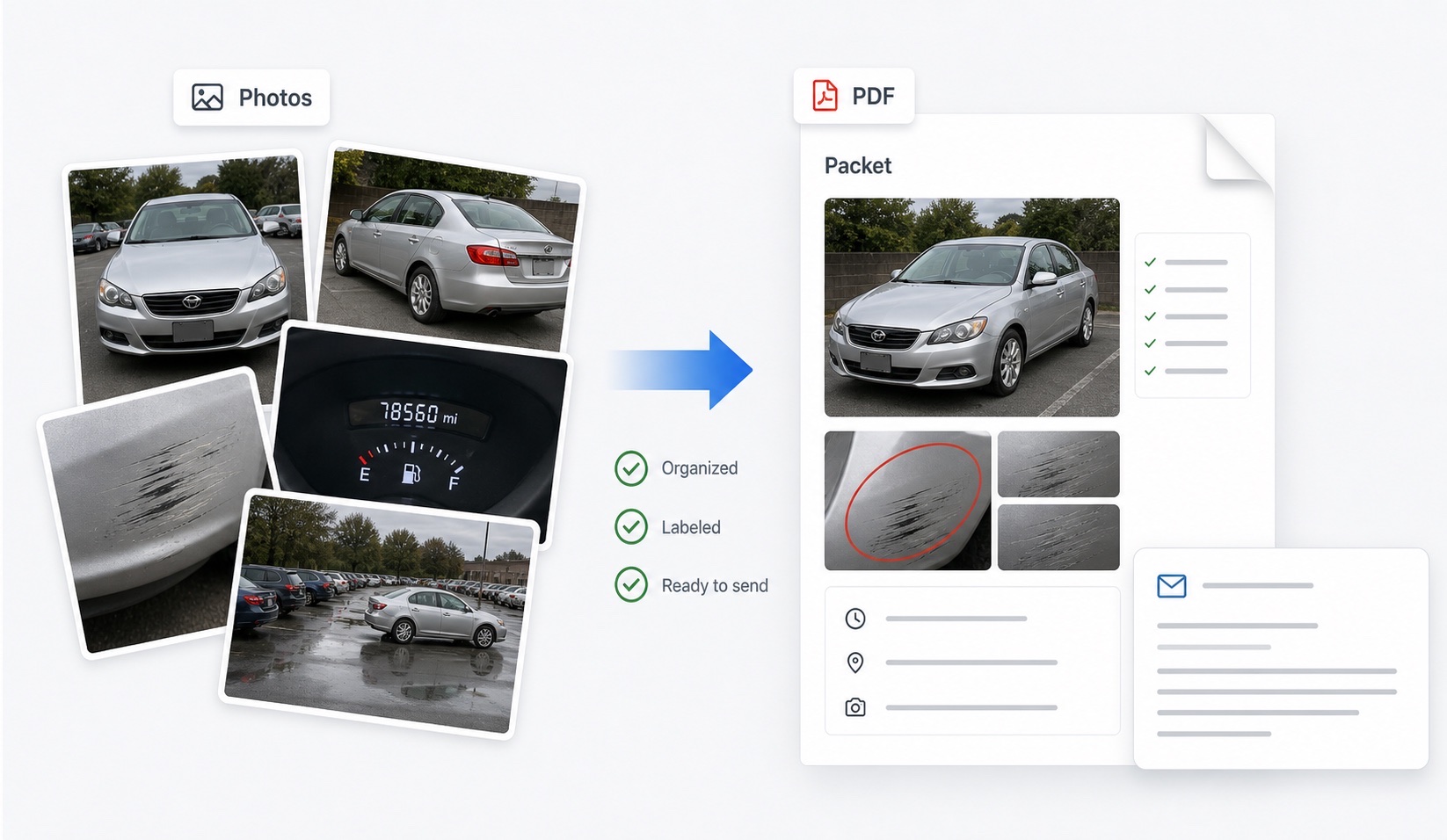
Turn car damage photos into a readable photo report: wide-to-close sequences, matched before/after pairs, captions with dates and vehicle areas, and a PDF packet for disputes, claims, and handoffs.
Why do car damage photos need a report around them?
Because a photo proves what it shows, not what it means. A close-up of a scratch, emailed loose, tells a reviewer nothing about which car, which panel, which date, or whether the mark predates the dispute — and reviewers resolve ambiguity against the party who created it. A photo report supplies the missing layer: captions carrying date and vehicle area, sequencing that runs wide-to-close so every detail shot is anchored to a context shot, before/after pairing that makes comparison mechanical, and neutral observations that say what is visible without arguing fault.
Most disputes start, as a practical matter, with too many photos and too little structure. The camera roll from a rental return might hold sixty images; the packet a claims agent can act on presents perhaps twenty-five, labeled and ordered. DamagePacket automates that transformation, and the exported PDF attaches to any email, portal, or claim file.
What photo coverage should the report be built from?
The report is only as strong as the underlying coverage. The set that survives challenge:
| Layer | Shots | Purpose |
|---|
| Context | Front, rear, both sides, four corners | Identifies the car; baselines overall condition |
| Panel | Each affected panel with a landmark in frame | Locates damage on the vehicle |
| Detail | Close-ups, one with an object for scale | Shows the damage itself |
| Systems | Wheels, glass, roof, interior | Covers the common claim areas |
| Anchors | Odometer, fuel, receipts, location context | Fixes time and place |
Shoot the same sequence at both ends of any handoff — matched angles are what make the before/after pages work. The photo technique guide and the rental checklist cover the method shot by shot.
How does the photo report handle originals and metadata?
The evidentiary weight of phone photos lives in their EXIF metadata — capture date, time, device, and usually GPS. The report workflow is built to preserve it: you upload copies, your originals stay untouched in your camera roll or backup, and the packet presents labeled versions while stating that unedited originals with metadata are available on request. That sentence, standard in well-run disputes, quietly answers the authenticity question before it is asked.
The corollary practices: do not screenshot your own photos (screenshots carry the wrong date and no location), do not run images through editors before submission, and when a reviewer requests originals, send the files themselves rather than re-exports. A photo report is a presentation layer over the raw evidence — never a replacement for it, and never an alteration of it.
Where does the photo report get used?
- Rental damage disputes: the before/after packet attached to a written dispute — the evidence guide shows the full file it slots into.
- Credit card benefit claims: the labeled photo layer in the administrator's checklist (filing guide).
- Insurance claims: the organized set adjusters estimate from, wide-to-close and captioned.
- Peer-to-peer rentals: trip-start/trip-end packets for Turo hosts and guests.
- Valet, parking, and car wash incidents: same-day condition records paired with receipts and incident reports.
- Small claims and escalations: the exhibit version of your correspondence trail.
One report, one situation: build the packet from the photos of that specific handoff or incident, state its gaps, and let the structure carry the argument. That is the whole product boundary — DamagePacket organizes the evidence; the decision belongs to whoever reviews it.
What separates a strong photo report from a weak one?
Reviewers see both daily, and the differences are consistent. Strong reports open with context shots and never present a close-up that cannot be traced to a wide shot. They pair before and after images of the same panel at the same angle, so comparison takes seconds. Their captions are factual — date, panel, what is visible — not argumentative. They disclose their own gaps (“no roof photo at pickup”) instead of hoping nobody notices, and they distinguish pre-existing marks from the damage at issue rather than leaving the reviewer to untangle them.
Weak reports invert each habit: orphaned close-ups, mismatched angles, captions that argue fault, silent gaps, and old damage mixed indistinguishably with new. The structure is learnable in one careful session — or generated by default — and it compounds: the same disciplined packet serves the rental dispute, the card claim, and the escalation without being rebuilt. Evidence organized once is evidence available everywhere the dispute goes.
FAQ
What is a car damage photo report?
A document that presents vehicle photos as organized evidence: each image captioned with date and vehicle area, sequenced wide-to-close, paired before-and-after where both sets exist, with neutral observations and disclosed gaps — exported as a PDF for disputes and claims.
Can I use after-only photos?
Yes. After-only sets still become a labeled, area-grouped record — useful for insurance claims, car wash and valet incidents, and any situation where a before set never existed. The report flags the missing comparison honestly rather than implying one.
Can I include HEIC photos?
Yes — common phone formats including HEIC, JPEG, and PNG are supported. Upload originals rather than screenshots so capture-date metadata stays intact on your copies; the report presents labeled versions while you keep the untouched files.
How many photos should a photo report contain?
Typically 15 to 40, curated: full-vehicle context shots, each relevant panel wide and close, and detail shots of every mark at issue. More photos help only when labeled — the report's captions and ordering are what keep a larger set reviewable.
Why not just email the photos as attachments?
Loose attachments arrive unordered, uncaptioned, and often compressed. Reviewers must guess which panel, which date, which handoff — and guessing reviewers ask follow-up questions or discount the evidence. A captioned, sequenced packet removes the guesswork.
